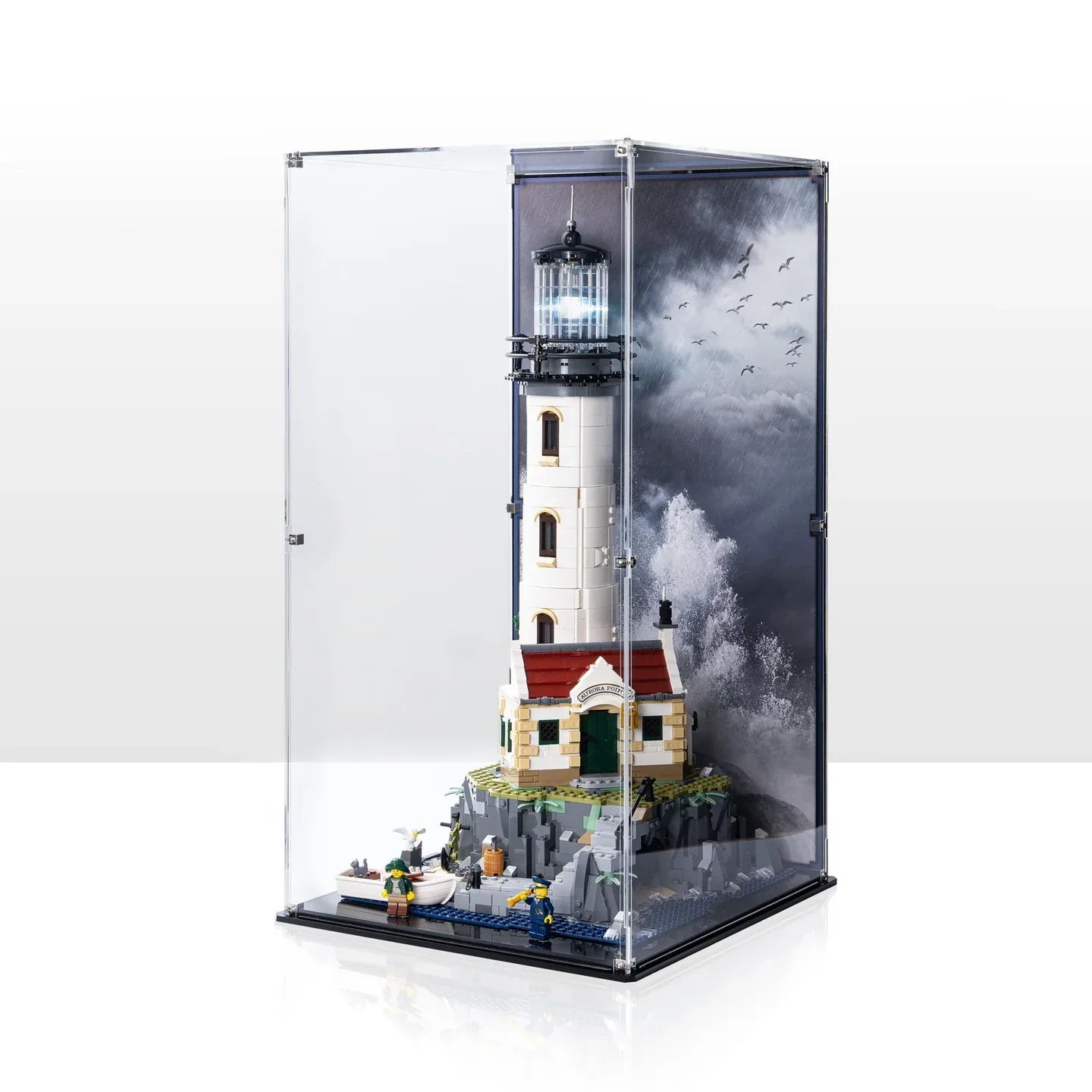
For LEGO Motorized Lighthouse 21335, choose a display case around two routines: viewing the rotating light and reaching the model when it needs attention. Switching the light on, opening the tower and servicing the battery arrangement are separate tasks. The tallest quoted enclosure does not necessarily provide the most useful access.
Include the lower island as well as the tall tower
LEGO's 21335 specification describes a rocky island with a cottage, steps, pier and cave, together with a rowboat and figures. Its descriptive model reference is over H54 × W25 × D25 cm. The rotating light and glowing cottage fireplace use the model's battery box, motor and light cable.
Record the complete scene you intend to retain inside the case. Identify the boat's position, figures beside the island and any additions beyond the supplied arrangement. The tower's narrow upper outline is not the receiving footprint for everything at its base.
Choose which side faces the room before ordering a printed background. A front view of the cottage and a view into the tower's rear are different compositions. Photograph the completed arrangement from those sides so the supplier can identify the actual scene and approach to its controls.
The switch, tower back and cottage roof need different approaches
| Task | What to record | What remains to confirm |
|---|---|---|
| Switch the light | Location of the model's actual button and the approach to it. | Which part of the case opens and whether the intended model position leaves that approach useful. |
| View the tower interior | The rear elements you intend to remove for viewing. | Whether the whole cover must come off first and where removed parts will rest. |
| Open the cottage | The roof and nearby scenery in your completed arrangement. | A distinct roof-removal and handling route. |
| Service the powered assembly | The actual model configuration and service task. | Instructions and access for that task; switch access alone does not establish it. |
LEGO identifies removable elements at the tower's back and a cottage roof that lifts off. Those are model features. They do not establish the space to perform either action beneath a case top or through a small opening.
Decide which tasks you expect to do at the display location and which require a more open workspace. Keep the manufacturer instructions with the model record. This guide compares case descriptions; it does not provide a wiring change, a battery-removal procedure or an alternative way to handle the tall build.
Outside heights and unclassified case sizes are different references
The descriptions below were read on 17 October 2026. They are published product references rather than our physical measurements or fit tests. The shopPOPdisplays text was available through a cached public reading; its current direct page did not expose the product body during verification, so confirm the selected assembly before ordering.
| Specific case | Published dimensions | Base or access detail |
|---|---|---|
| Wicked Brick 21335, LDS435.1.7 | External W31 × D33 × H57.3 cm. | Model-locating stems and figure studs. Full description identifies tilting the clear cover from its base for button access. |
| Brickcessories 21335 | Assembled case 300 × 300 × 560 mm. | Axes and inside/outside are not stated in the size sequence. Gloss black base and clear, black or printed rear choices. |
| Flying Box 21335 | Case L12 × W12 × H22.5 in; separate base 12.5 × 12.5 in. | The case line does not say inside or outside. Keep the larger base in the furniture plan. |
| Blacked Brick 21335 | External W33 × D35 × H56 cm. | Figure studs and plaque described. Obtain the usable interior and model-button access separately. |
| shopPOPdisplays P_21033 | Approximate external size including base: H22.7 × W12.8 × D13.5 in. | Black acrylic base plate; the published text excludes LEGO studs and stand. Confirm the current package and usable cavity. |
An external height cannot be compared with the model's height as though the difference were free space above the tower. The usable height begins at the finished surface supporting the build. Base layers and cover seating remain part of that definition even when their material thicknesses are listed.
Flying Box's separate base dimensions also matter below the model. Reserve the complete 12.5-inch-square base footprint, then obtain the case's defined cavity. The smaller case line does not reduce the area of furniture that the complete assembly occupies.
Wicked Brick's detailed wording identifies the clear cover
Wicked Brick's short introduction refers generally to tilting the display, but its full feature description specifies tilting the clear case up from the base to reach the on/off button. Keep the moving component explicit. Do not turn that wording into an instruction to tilt the lighthouse, island or loaded base.
Ask for the exact cover-opening routine and the space it requires at your intended location. Check nearby walls and the shelf above against that documented movement. Button access is still a narrower task than removing rear tower elements, lifting the cottage roof or servicing the powered assembly.
For another supplier, establish its own routine opening. An assembly video link, a panel seam or a set-specific title does not demonstrate a dedicated switch flap. Keep that question open until the actual product instructions answer it.
Choose the background for the views you want to retain
A scenic rear panel can frame the light and coastline, while a clear rear can retain another view of the building. Decide which details matter from the room before choosing that option. A background photograph does not establish an unobstructed view into the tower's back or a documented illumination result.
Keep locating features equally specific. Blacked Brick's description identifies studs for minifigures; that does not establish a stem securing the lighthouse. Wicked Brick separately describes model stems and figure positions. Do not transfer one product's attachment description to another.
Plan the actual light view at the final location and use the display lighting and reflection guide for that separate viewing decision. Supplier statements about motor-noise cancellation, complete dust exclusion or protection are not independent performance measurements in this comparison.
The blank lighthouse view and access worksheet keeps the switch, service, tower and cottage tasks apart. Once the selected case is defined, use the LEGO shelf-case guide to plan the full enclosure's placement and opening space.
Cover image supplied by CubeBuff and used with permission. It shows CubeBuff's own display product; the five-source comparison above concerns separate products.
Common questions
Does light-switch access also mean battery access?
That does not follow from the switch claim. Identify the service task and obtain the model and case instructions that cover its actual route.
Should I tilt the whole model to reach the button?
Do not infer that from the short description. Wicked Brick's detailed feature text identifies the clear cover, and the exact opening routine should come from its instructions.
Are the Flying Box case and base both 12 inches square?
The cited listing separates a 12 × 12-inch case line from a 12.5 × 12.5-inch base. Preserve both references and ask for the cavity definition.
Comments
Share a display tip or ask a question.